Clear your company information in Estimating Link when you are transferring ownership, after updating your company name, after updating your CLI #, etc. 🗒️Note: Make sure you have contacted TCLI to update your company name in the main database before proceeding.
Step 1: Clear Company Info in Command Prompt
Open the Command Prompt. You can search for this in your Windows search function on your taskbar at the bottom of your windows screen.
You can either manually type the below text that is not bolded or copy and paste into the command prompt. If you're copying, please don't copy the space between the colon and the beginning of the text.
Command Prompts:
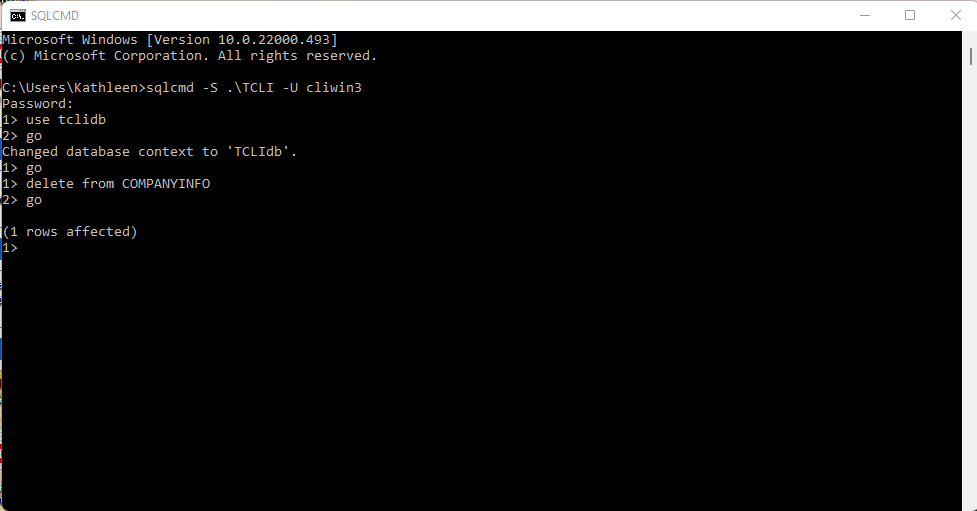
- Copy/paste: sqlcmd -S .\TCLI -U cliwin3
- Click: Enter
- Manually type: tcli4333% (you will not see the password as you're typing)
- Click: Enter
- Copy/paste: use tclidb
- Click: Enter
- Manually Type: go
- Copy/paste: delete from COMPANYINFO
- Click: Enter
- Manually Type: go
Step 2: Clear company info in the Registry Editor
Open the Registry Editor. You can search for this in your Windows search function on your taskbar at the bottom of your windows screen.
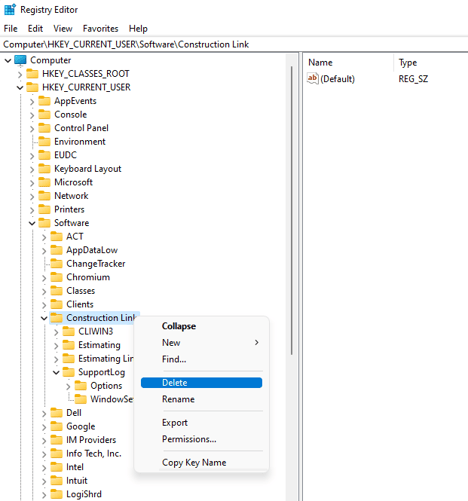
- Click the carrot next HKEY_CURRENT_USER.
- Click the carrot next to Software.
- Right click on Construction Link and select Delete.
See the screenshot below: